Percentage Increase Calculator
Need to measure growth or progress? Our Percentage Increase Calculator gives you instant results! Just enter your original and new values, and see the exact percentage rise in seconds. Ideal for budgets, salary raises, sales reports, or school projects.
Share Calculator


Common Calculators | |
Table of Contents
- 1. What is the Percentage Increase Calculator
- 2. Percentage increase calculation formula
- 3. Steps to Calculate Percentage Increase
- 4. Examples of Calculating Percentage Increase
- 5. Examples of growth in businesses
- 6. Monthly Increase Percentage Calculation Methodology Approach
- 7. yearly percentage increase calculator method
- 8. Percentage Decrease Calculator – The Inverse
What is the Percentage Increase Calculator
The Percentage Increase Calculator is quite simple and can be used to determine the Percentage Increase. It is inevitable to enter the number of this new product. It shows the percentage increase, which helps in finding the percentage increase. The Percentage Increase Calculator mainly focuses on helping users perform Percentage Increase calculations easily. Regardless of your profession type, as an engineer, business person, student, or any other profession, you will find it useful when calculating the Percentage Increase. It displays the Percentage Increase, which makes calculating the Percentage Increase easier.
The Percentage Increase Calculator primarily aims to simplify Percentage Increase calculations. Whether you operate as an engineer, businessperson, student, or in another field, it is useful for calculating the Percentage Increase. In this order, you can save time and use the best solutions.
Percentage increase calculation formula
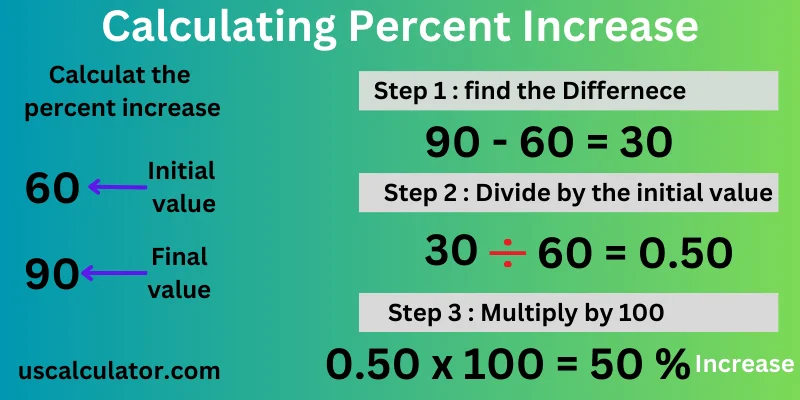
Now we will understand how to calculate the Percentage Increase. The formula for calculating the percentage increase between two values is as follows: which is given below
Percentage Increase = [(New Value - Original Value) / Original Value] × 100
| Percentage Increase = ( |
| ) × 100 |
Steps to Calculate Percentage Increase
Here's what each portion of the equation speaks to:
Original Esteem: This is the beginning of esteem; some time ago, it increased.
New Esteem: This is the final esteem after the increase.
Steps to Calculate the Rate Increase
1. Discover the contrast between modern and unique esteem. Subtract the unique esteem from the modern value.
2. Partition the distinction by the unique esteem. This gives you the relative increment as a decimal.
3. Duplicate by 100 and include a percent sign. This changes the decimal to a rate.
Examples of Calculating Percentage Increase
We have given some examples here. We now understand three models of percentage growth.
Example 1: Old values vs. new values.
Suppose a jacket cost $200 last year and now costs $240. What is the percentage of inflation?
First, we show the difference between the two prices: $240 (new) minus $200 (original) = $40. Here, the price has increased by $40. We then calculate the relative increase: $40 (increase) / $200 (stable) = 0.2. The relative increase is 0.2. We will then calculate the percentage increase in the relative trend. = 0.2 x 100% = 20% Therefore, the price of the jacket increased by 20%.
Example 2: We will now compute the cost increase as a percentage.
Let's say your monthly salary rises to $5,500 from $5,000. What percentage of revenue increased?
We first differentiate the two incomes. $500 more is added to the initial $5,500 (difference) after deducting $5,000. The revenue has gone up by forty. Next, we figure out the relative increase. $500 (increase) / $5,000 (standard) = 0.1 is the relative increase. It is a 0.1 relative gain. The relative increase will then be multiplied to determine the percentage increase. 10% is the relative increase (0.1 x 100%).
Your monthly income has therefore gone up by 10%.
Example 3: Here, we shall determine the percent change in the body weight (weight). For instance, let us assume a person's weight is 70 kg, and the same person gains about 5 kg, so that the weight becomes 75 kg. What is the difference between the numbers as a percent increase in body weight?
First, we decide here the difference between two kilograms (weight). Difference = 75 kg (new) minus 70 kg (original) = 5 kg increase. Here, the weight (kg) has increased by 5. Now we will calculate the percentage increase by dividing the relative increase. Relative increase = 5 kg (increase) / 70 kg (baseline) = 0.0714. The relative increase is 5 kg. Now we will calculate the percentage increase from the relative growth. Percentage increase = 0.0714 x 100% = 7.14% (rounded off to two decimal places)
So, his body mass increased by 7.14%.
If you calculate the Percentage Increase calculation based on the Percentage Increase formula but have any doubts, use our Percentage Increase calculator to double-check the findings if you're not sure.
Example 4:
Now, we will calculate the percentage increase with a formula. Now, we have a calculation formula, so it is easy to calculate a percentage increase. Let's say you have an original value of $50, which increases to $75.
We understand. Here's a step-by-step example:
| Percentage Increase = ( |
| ) × 100 |
| Percentage Increase = ( |
| ) × 100 |
Percentage Increase = 0.5 × 100
Percentage Increase = 50%
So, the percentage increase from $50 to $75 is 50%.
Examples of growth in businesses
Suppose you are the proprietor of a little company. And need you to increase your commerce. Right now, your company has 100 clients. And you earn $50,000 a month. Presently, you need to increase the earnings of your company by 25%. In such a circumstance, you will require more clients. But if you need to increase the company's commerce by 25%, how many extra clients will you require? You can do this calculation exceptionally effortlessly with our rate increment calculator. But we will check this. We have 100 clients and need to grow by 25%. So 25% of 100 implies 1/4th of 100 = 25 clients. Presently, if we need to increase our trade by 25%, we will require 125 clients.
Monthly Increase Percentage Calculation Methodology Approach
Another use for such calculations is for tracking month by month progress based on a variety of needs such as retail sales tracking, software as a service revenues, and web traffic monitoring.
To get the percentage gain for a month, the same formula as above can be applied except now the last month’s value is used as “old” and this month’s value is used as “new.”
When it comes to overall average increase that can be calculated for the average month over the periods, there are also two ways:
You can calculate the monthly increase percentage separately for every month and take an average of these ratios or you can take the compound growth rate if you would rather know the overall move from the beginning to the end of the period useful for different kinds of analysis.
Let’s take a simple example:
We have $12,000 earned in January.
In February, it increases to $13,200 → ((13,200 − 12,000) /12,000) × 100 = 10%.
In March, it increases to $14,520 → ((14,520− 13,200) / 13,200) × 100 = 10%.
Thus, the average increase over these periods equal to 10%.
If you see a lot of variations between these two months, make sure that you follow both of these techniques and get the entire
For instance, let's say:
January Revenue: $12,000
February Revenue: $13,200 → ((13,200−12,000)/12,000)×100 = 10%
March Revenue: $14,520 → ((14,520−13,200)/13,200)×100 = 10%
So, the average monthly increase is 10%.
To get the complete picture of monthly revenues, the individual monthly rates must be observed, as well as monthly revenues from the first month to the last one.
yearly percentage increase calculator method
YoY analysis eliminates the seasonal distortion and is frequently used for financial reporting and long-term planning.
The old value is the value from the previous year (the year before); new figures are the values from this year.
Example:
Sales for quarter 2 of 2025 were $245,000
Sales for quarter 2 of 2026 were $289,100
Then by applying the formula:
((289,100 − 245,000) / 245,000) × 100 = 18%
If total sales for the year are considered, the method is identical. For determining the growth rate for a number of years, the compound annual growth rate (CAGR) formula is used:
CAGR = ((Ending Value / Beginning Value)^(1 / Number of Years) - 1) × 100
Many calculators do calculations on simple change between periods; CAGR is the version of the calculator designed to measure several years growth.
Percentage Decrease Calculator – The Inverse
Sometimes there is a drop in the value. The method for calculating it is really similar to what has been discussed before:
Percentage Decrease = ((Old Value − New Value) ÷ Old Value) × 100
Alternatively, you can work out the increase and note that if you see a negative result, that means that there was a decrease.
For instance: A product priced at $80 has changed to $68 now.
((80 − 68) / 80) × 100 = 15% decrease:
The main thing here is to be cautious when interpreting the results. A situation of a 50% decrease and then a 50% increase does not leave you with the original number again. If we take the starting figure of 100, we will get to 50 after the decrease to the initial two times – too far from the starting point.