Antilog Calculator
Need to reverse a logarithmic value? Our Antilog Calculator makes it easy! Whether you're working with pH levels, decibels, or financial growth rates, quickly convert log values back to their original numbers. Just enter your log result and base to get instant antilogarithm solutions.
Share Calculator


Common Calculators | |
Table of Contents
- 1. What is a Logarithm?
- 2. Antilog Calculation Formula
- 3. Antilog Calculation Example
- 4. 100 Logarithm Base and Number 5 Antilog Calculation Example with Formula
- 5. How to calculate an antilog?
- 6. Common Real-World Uses for Antilog Calculations
- 7. Antilog Mistakes That Can Throw Off Your Answer
- 8. Comprehending Antilogarithms: Acquiring Knowledge of the Logarithmic Inverse
- 9. Calculating an antilog is straightforward. You can either:
- 10. Utilising the antilog function in real-world applications
- 11. Antilog Table
- 12. Antilog calculator base 10
- 13. Log to Antilog Calculator: Step-by-Step Conversion
- 14. FAQ
What is a Logarithm?
A logarithm answers the question:
"To what power must we raise a base number to get another number?"
Mathematically:
Where:
- = Base (must be > 0 and ≠ 1)
- = Positive number
- = Logarithm (exponent)
Example
log10 (100) = 2 because 102 = 100
Antilog Calculation Formula
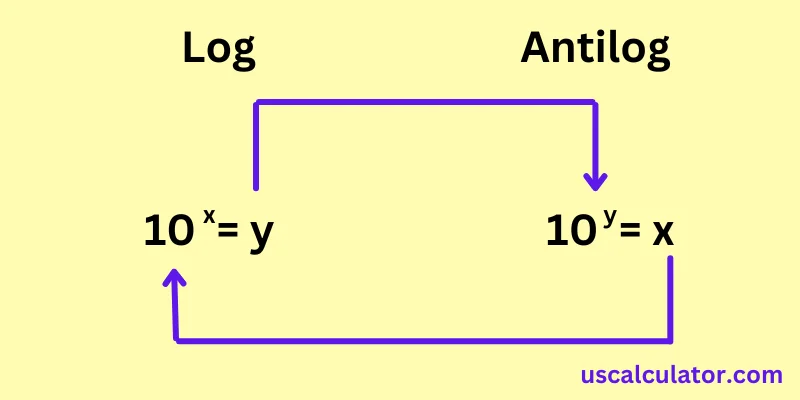
An antilogarithm (antilog) reverses the log process, converting a logarithmic value back to its original number.
Antilog Formula
- = Original base
- = Logarithmic value
Antilog Calculation Example
Example 1: Base 10 (Common Antilog)
Find antilog10 (3.5)
Answer
103.5 = 3162.28
Used in pH calculations (e.g., converting pH 3.5 back to H⁺ concentration).
Example 2: Base *e* (Natural Antilog)
Find antiloge (2) (i.e., e2)
e2 = 7.389
Used in continuous growth models.
Example 3: Custom Base (Base 2)
Find antilog2 (5)
Answer
25 = 32
Used in computer science (binary systems).
100 Logarithm Base and Number 5 Antilog Calculation Example with Formula
Now let us understand antilog calculation. The logarithm and the antilogarithm are inverse operations. The antilogarithm with a base of 100 for the logarithm of 5 is calculated using the formula:
Antilog100 (log100 (5)) = 100log 100(5)
So, you raise the base (100) to the power of the logarithm of the given number (5) with a base of 100. In this case, since the logarithm is 5, the calculation simplifies to:
Antilog100 (5) = 1005
Using a calculator:
Antilog100 (5) = 1005 = 10,000,000,000
Therefore, Antilog100 (5) is equal to 10,000,000,000.
How to calculate an antilog?
Here, we understand the antilog and how to calculate the antilog. We will raise the base to that number by exponentiating the supplied log number to determine the antilog of that log number with that base. We will take an example here to calculate the inverse log function.
log53 (antilog of 3 with a base of 5), just solve 53 = 5 x 5 x 5 = 125
Here, we will take the antilog of 2 with a base of 7 as an additional example. To calculate it, raise 7 to the power of 2.
resulting in: 72 = 7 x 7 = 49.
If you calculate antilog according to the antilog calculation formula, but you aren't sure, then use our Antilog calculator to check if your calculation is correct.
Common Real-World Uses for Antilog Calculations
Everyday Applications of Antilogarithm Calculations
Antilogarithms can be found in a number of places, some of which are not commonly known. Here is a list of common applications of the antilogarithm.
pH Chemistry
The pH scale is understood in the form of logarithms. In an environment where pH is known, the concentration of hydrogen ions is used to calculate the pH:
[H+] = 10−pH
For example, at pH 7, If something has a pH of 7, it is neutral and hence not either acidic or basic. At this point, the amount of hydrogen ions is equal to that of hydroxide ions in the water. Pure water measured at room temperature is at pH 7.:
[H+] = 10−7 mol/L
That’s an antilog calculation in action.
Sound and Decibels
A decibel reading compares sound intensity to a reference level. The formula is:
Decibel formula:
dB = 10 log10 ( I / I0 )
To find intensity ratio (antilog):
I / I0 = 10dB/10
Example: For 80 dB, intensity ratio = 1080/10 = 108 = 100,000,000.
Compound Growth and Finance
When you have known logarithmic returns, you have an easy way to calculate growth using an antilogarithmic function. For example, if the log return for an investment is equal to 0.0636, then in this case, we can find that
100.0636 = 1.1576
so the investment yields a return of about 15.76%.
Using this technique works well together with a compound interest calculator if you often deal with rates of return.
Antilog Mistakes That Can Throw Off Your Answer
In my experience teaching this topic, the same handful of mistakes appear again and again. Here’s what to watch for.
1. Using the Wrong Base
A logarithm value of 2 means different things in different bases.
Antilog10 (2) = 100
Antiloge (2) = 7.39
Antilog2 (2) = 4
Always confirm whether the problem uses base 10, base e, or a custom base.
2. Misreading Negative Exponents
A negative logarithm value does not give a negative number. It gives a positive number less than 1.
Example:
Antilog10 (−2) = 10−2 = 0.01
The result is positive. This is a common point of confusion.
3. Rounding Too Early
A minuscule deviation in the value of a logarithm can lead to drastic changes in the results due to the exponentiation. Overzealous rounding can lead to wrong final digits.
4. Forgetting the Characteristic in an Antilog Table
When using an antilog table, students sometimes find the mantissa value and stop. Remember to multiply by 10characteristic. Missing this step can make the answer off by 100 or 1000.
5. Confusing Log and Antilog Buttons on a Calculator
On many scientific calculators, the LOG button calculates the logarithm, while the inverse or second function gives 10x, which is the antilog. If you press the wrong function, you’ll get a completely different answer.
Comprehending Antilogarithms: Acquiring Knowledge of the Logarithmic Inverse
If you have never heard of antilog, then antilog, or simply antilog, refers to the inverse value of a logarithm. Antilogarithm is the reverse of log: they generate the exponent you need to raise a base number to a certain value. But they reveal the number that you get when you lift the base to the power of a certain exponent.
Calculating an antilog is straightforward. You can either:
Use a calculator: Most scientific calculators have a dedicated "antilog" button or a function like log^(-1). Just enter the value of the exponent (y) and choose the correct base (b).
To the exponent's power, raise the base: The manual technique is as follows. Antilog_10(2), for instance, is equal to 10 raised to the power of 2, or 100.
Utilising the antilog function in real-world applications
Converting power ratios in electronics and acoustics from decibel (dB) values. Using pH values (negative logarithms of hydrogen ion concentration) to calculate concentrations in chemistry.Modeling physics and biological events with exponential growth or decay.
Coding and cryptography to provide safe data transfer. Numerous disciplines use signal processing and image analysis.
Antilog Table
Antilog tables conventionally used
Before the age of the calculator people relied on antilog tables for printing purposes. These tables display mantissa and provide the corresponding antilog value for the same number of digits.
Typical steps while using an antilog table are to:
Separate the characteristics and mantissa of the log.
Refer to the mantissa in the table to know about the digits in the antilog.
Use the characteristics to place the decimal point. A characteristic of 2 indicates the number would be between 100 and 999. a characteristic of –1 means it is between 0.1 and 1.
Antilog tables can still be helpful to understand the nature of numbers and in case of examination when calculators are not allowed. An antilog calculator does the same lookup and calculation but electronically.
Antilog Table (Base 10)
Mantissa from .00 to .99 • Antilog Values + Mean Differences
| No. | Antilog Values | Mean Differences | |||||||||||||||||
|---|---|---|---|---|---|---|---|---|---|---|---|---|---|---|---|---|---|---|---|
| 0 | 1 | 2 | 3 | 4 | 5 | 6 | 7 | 8 | 9 | 1 | 2 | 3 | 4 | 5 | 6 | 7 | 8 | 9 | |
1. Take the mantissa (decimal part) of the logarithm.
2. Use the first two digits after the decimal as the row (No.).
3. Use the third digit as the column under “Antilog Values”.
4. Add the Mean Difference corresponding to the fourth digit.
5. Place the decimal point after the first digit and multiply by 10characteristic.
Antilog calculator base 10
Understanding the Functionality of a Calculator for Antilogging (For Base 10 and onwards)
Typically, a standard calculator for antilog start with one simple process:
The calculator takes logarithmic value ( example 2.4567) as input.
Then it computes 10^2.4567. Power 10.
Finally, it shows the result with the correct precision. 285. something.
The same rule is applied for the other bases. If it is natural logarithm input, the value of e will be taken as approximately equal to 2.71828. There are also
sophisticated calculators which allow calculating using custom bases with the formula being base^y.
Check that the output is correct using the following relation:
antilog(log(x)) = x and log(antilog(y)) = y.
Log to Antilog Calculator: Step-by-Step Conversion
Logarithm to Antilog Converter: Stepwise Procedure
One of the greatest challenges is transforming a log value to an antilog. Given below is the procedure that may assist you in log to antilog conversion either manually or by log to antilog converter online:
Find the base of the logarithm (commonly 10 or e).
Feed the log value in the calculator.
Get the output.
Round according to the precision of the original data.
Example (base 10):
log₁₀(x) = 3.2041
antilog(3.2041) = 10^3.2041 ≈ 1600
Example (natural log):
ln(x) = 2.302585
antilog ≈ e^2.302585 ≈ 10
You can also do this in reverse way to validate the calculation.
FAQ
1. What does the term antilog mean?
The term "antilog" means a specific value of x at which log(x) equals a given value y. The meaning of the term for common logs is 10^y.
2. How can one calculate antilog using an antilog table?
Use a printed antilog book for the mantissa and include the characteristic to find where the decimal point goes. For rough estimates you can also use known powers of 10.
3. Can the terms inverse log and antilog be used interchangeably?
Yes, they refer to the same process of inverse log operation as well.
4. Can antilog calculation be done for various bases?
Yes, most calculators do support calculation of antilog at arbitrary bases. It means that the definition remains base^y.
5. hat is the meaning of “10^x” in the calculator instead of “antilog”?
The meaning is quite the same, as the outcome of both operations is identical in terms of base 10. The 10^x button is the antilog function.